
papagal · a data viewer for macOS · v1.0.22 · Apple Silicon & Intel · macOS 13+
Opens anything
with rows in it
pa·pa·gal noun
/pa-pa-GAL/ · from Bulgarian папагал
- 1.A parrot.
- 2.A small, very fast Mac app that opens databases and data files and shows them as a grid you can scroll, filter, sort, query and export. SQLite, Parquet, Excel, CSV, JSON, SQL dumps. No server, no setup, no Electron.
see also: Quick Look, SQL console, Metal GPU grid
- free
- forever, up to 1,000 rows per page
- pro
- $15 one time, 3 Macs, no subscription
- file
- Papagal.dmg · 25 MB · macOS 13 Ventura or later
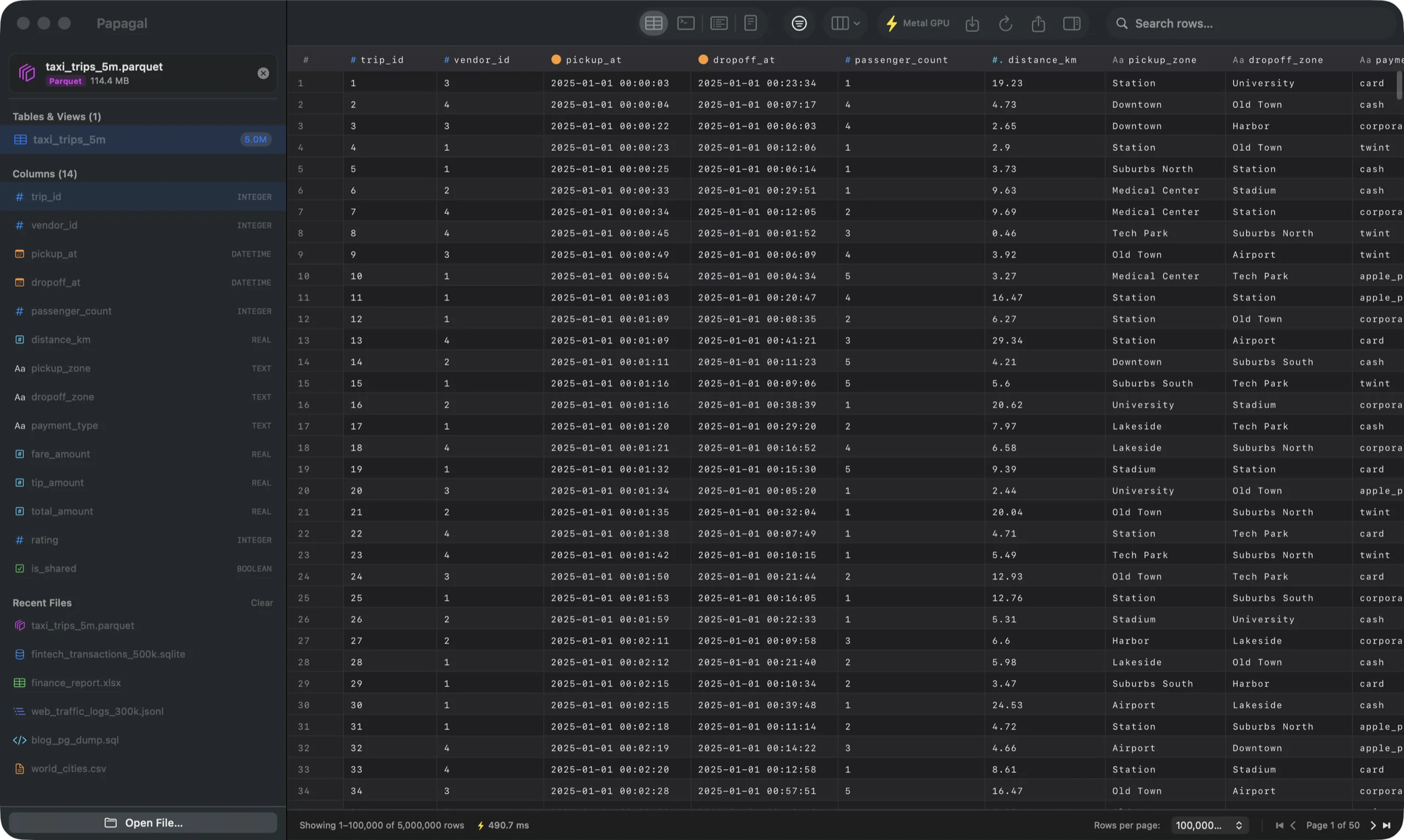
Seven kinds of file.
Zero import wizards.
Double-click a file, drag it on the Dock icon, or press Space in Finder for a Quick Look preview.
| # | extension | format | opens as | worth knowing |
|---|---|---|---|---|
| 1 | .sqlite .db .sqlite3 | SQLite | every table and view | Edit cells in place; changes write straight to the file. |
| 2 | .parquet | Apache Parquet | the file, queried in place | Multi-million-row files open instantly. Nothing is loaded into memory. |
| 3 | .xlsx .xls | Excel | one table per sheet | Dates show as dates. Legacy .xls from 1997 works too. |
| 4 | .csv .tsv | Delimited text | one table | Comma, semicolon, tab or pipe. UTF-8, UTF-16, Windows-1252. |
| 5 | .json | JSON | an array of objects | Nested values stay JSON. Wrapper objects are kept on save. |
| 6 | .jsonl .ndjson | JSON Lines | one row per line | Hundreds of thousands of lines, parsed on every core. |
| 7 | .sql | SQL script | the tables it creates | SQLite scripts, plus MySQL and PostgreSQL dumps (COPY included). |
7 rows · sorted by how often people ask
Small app.
Unreasonably quick.
Actually native
Swift and AppKit, with a grid drawn by Metal. No Chromium, no Node, no web view pretending to be an app. It opens like Preview does.
Big files are fine
Parquet is queried in place, so a 5,000,000-row file opens straight away. CSV and JSON stream in on every core instead of freezing the window.
Filter the whole table
Stack conditions per column (contains, =, >, starts with, is empty…) and they run in the database, so counts, pages and exports all agree.
Columns your way
Drag a separator to resize, double-click it to fit, hide the columns you don’t care about. Papagal remembers the layout per file.
SQL when you want it
A console for real SQL on any file, even a CSV. Your LIMIT stays your LIMIT, PRAGMA works, errors say what went wrong.
Edit and save
Pro: double-click a cell, type, ⌘S. Only the cells you touched change on disk, down to the original number formatting.
Export anything
Pro: whole tables to CSV, TSV, JSON, Markdown or SQL INSERT, streamed to disk with a progress bar and a cancel button.
Every Mac since 2017-ish
One universal app for Apple Silicon and Intel, macOS 13 Ventura or later, including Intel and AMD graphics.
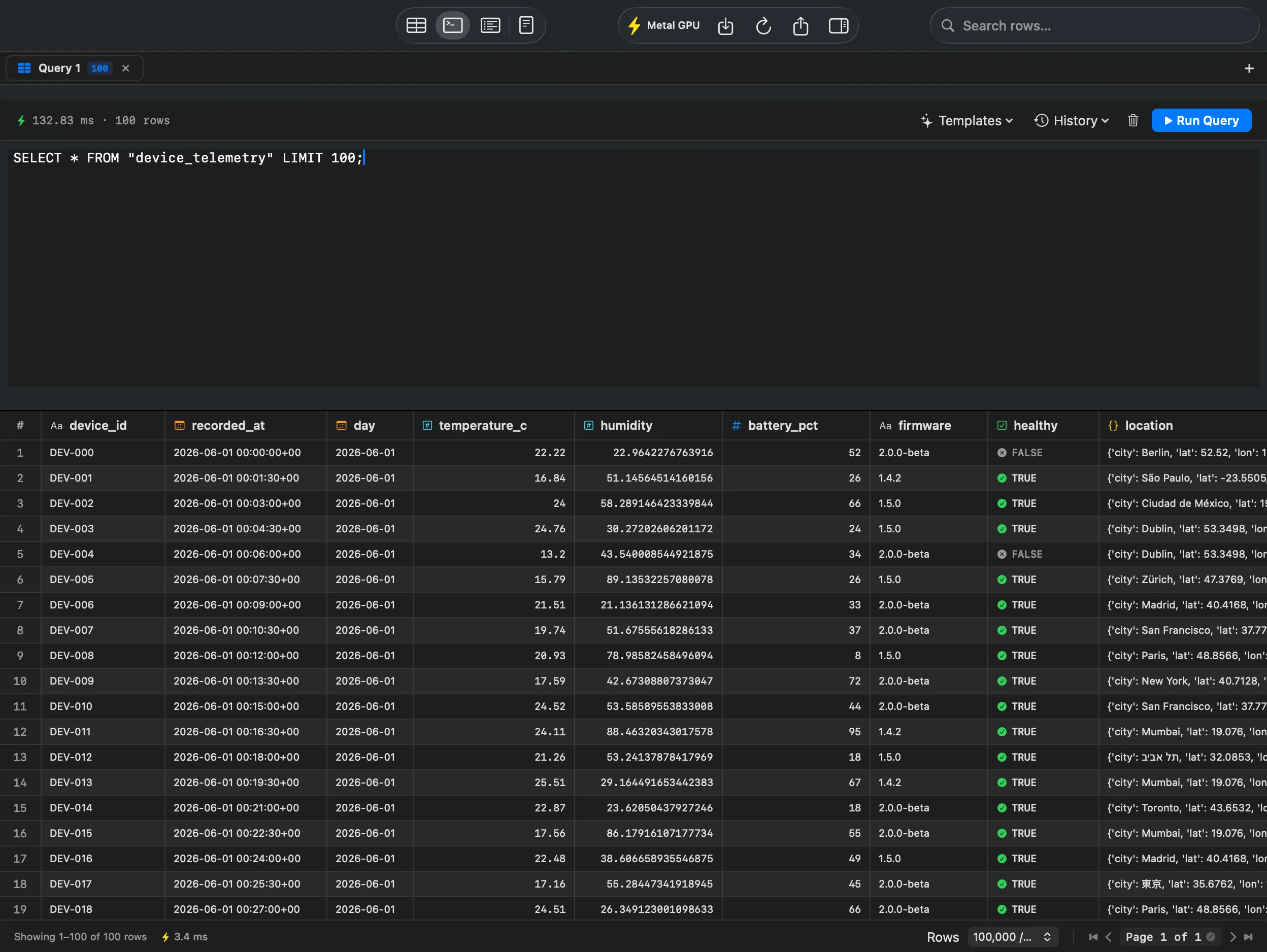
Same grid, same filters, any file. Multiple tabs and query history in Pro.
Free to look.
$15 to touch.
Viewing is free, forever, no account. Pro is for when you want to change things, go big, or get data out. One payment. No subscription, no seat math.
The whole viewer: every format, schema, search, filters, column tools and the SQL console, up to 1,000 rows per page. Good for poking at files, which is most of what people do.
Papagal Pro
receipt · papagal.dev · merchant: Polar
paid once · tax handled by Polar
Buy ProTHANK YOU · COME AGAIN
| free | pro · $15 once | |
|---|---|---|
| Open all 7 formats, schema, search | yes | yes |
| Filter, sort, resize and hide columns | yes | yes |
| Rows per page | 1,000 | 100,000 |
| Metal GPU grid | — | yes |
| Edit cells and save to the file (⌘S) | — | yes |
| Export to CSV, TSV, JSON, Markdown, SQL | — | yes |
| SQL console | 1 tab | tabs + history |
| Macs | as many as you like | 3 per license |
| Your data leaves your Mac | never | never |
privacy
Four network calls,
none of them your data
- Files
- Parsed and queried on your Mac. Never uploaded, never cached anywhere else.
- Telemetry
- None. No analytics SDK, no crash uploader, no usage pings.
- Network
- Only two calls, ever: checking your Pro license with Polar, and checking for updates.
- Sandbox
- The Quick Look preview runs sandboxed and read-only.
answers
The seven things
people ask
▸Which files does it open?
▸Is it really native, or a web app in a trench coat?
▸Which Macs does it run on?
▸What’s the catch with the free version?
▸Is my data private?
▸How do licenses work?
▸Can it edit my files?
contact
Write to me
A file that won’t open, a format you want, a license question. I read every one of these myself, usually the same day.